Police Clearance Online Verification in the Philippines (2026 Guide):
The NPCS offers an online verification system for police clearance certificates, allowing you to quickly verify your own or someone else’s certificate.
With just a few clicks, you can confirm whether a certificate is genuine, issued to the rightful holder, and still valid using the clearance ID.
In this article, you’ll learn how to verify a police clearance certificate (PCC) online through a simple, step-by-step process. To make it even easier, we’ve included screenshots for every step so you can complete the verification without any confusion
Step-by-Step Guide to Police Clearance Online Verification:
Do you want to know how to perform police clearance online verification? Here is a complete step-by-step guide, accompanied by images for your convenience:
Step 1. Access the NPCS’s(National Police Clearance System) Official Website:
Go to the official NPCS website.
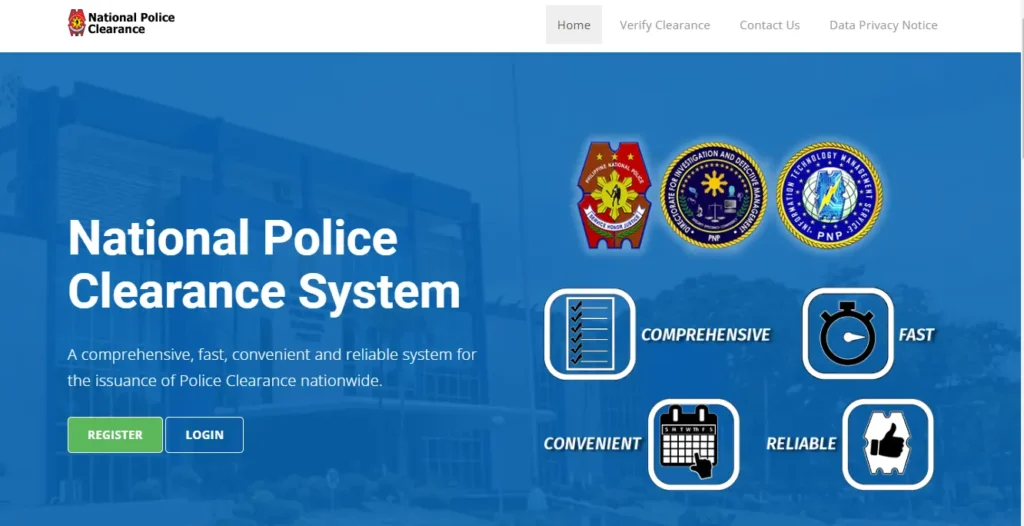
This is the home page of the NPCS website.
Step 2. Select the “Verify Clearance” Option:
In the header section of the home page of the NPCS website, there is an option, Verify Clearance.
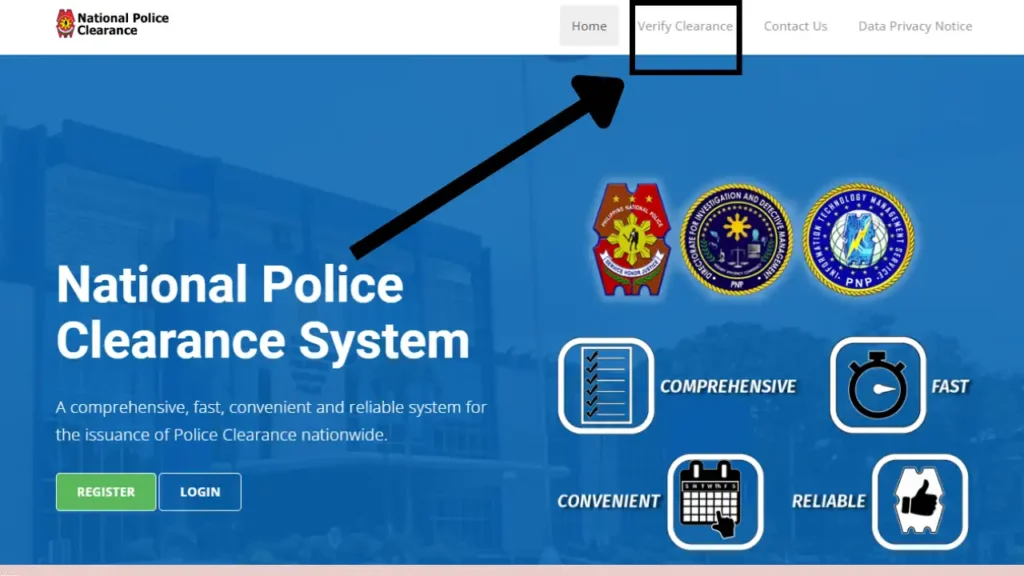
Click this option. A form will open on the screen. It will contain two sections for the required data. The sections are for the Surname and Clearance Number of the applicant written on the national police clearance certificate.
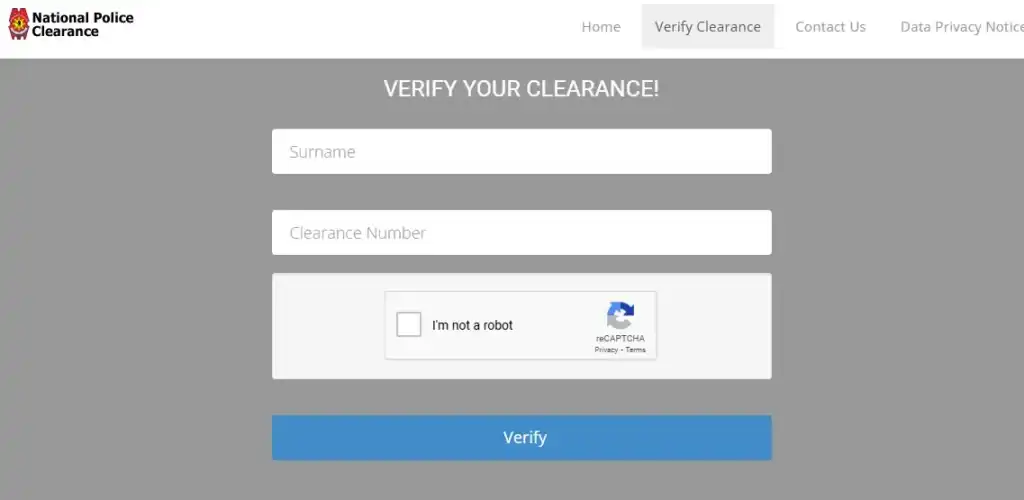
You will need to provide the Surname and Clearance Number correctly from the clearance certificate.
Step 3. Fill Out the VERIFY YOUR CLEARANCE! Form:
Fill out the VERIFY YOUR CLEARANCE! Form.
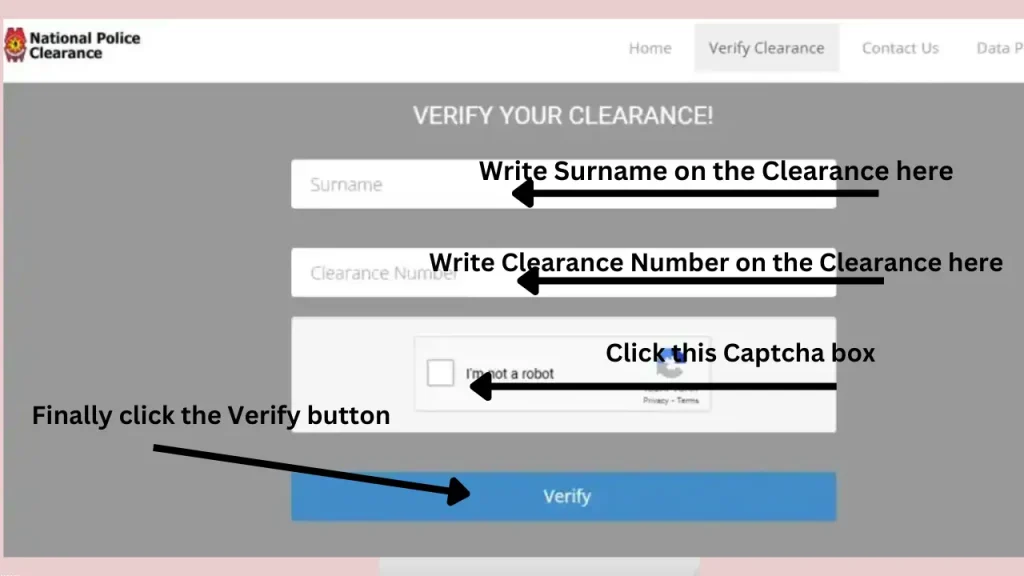
Write your correct Surname and Clearance Number in their respective sections. They should be the same as written on the clearance certificate, and then click on the box to complete the captcha challenge.
Finally, click on the Verify button.
You will get all the details regarding the national police clearance certificate for your provided date. You will get whether the certificate exists in the NPCS data or not, who holds it, and the validity information of the certificate.
If you want to check the authenticity of a PNP clearance certificate of an applicant as an employer or a government agency position holder, you can enter the data of a person from the certificate in the online verification form and verify it.
When you click the Verify button, you can expect two kinds of results:
- If the certificate is valid, it will show you the details.
- If the certificate is not valid, it will show you an error or a ” not found” message.
This process takes less than a minute, but it provides peace of mind. You can also verify your TIN ID online. Read our detailed guide on TIN ID Online Verification to learn the complete process.
Other Ways to Verify Your Police Clearance Certificate:
There are three methods to verify the police clearance ID:
- Online Verification Method.
- Contact the NPCS helpdesk.
- Visiting the Police Station.
Police Clearance Online Verification via NPCS System:
It is the easiest, time-saving, and most convenient method. You can do the verification process for a PNP clearance certificate in a minute using your phone or pc. We have discussed this method in simple three steps at the start of this article.
Contact the NPCS Helpdesk:
You can also take help/support from the NPCS helpdesk. There are two ways of contacting the helpdesk: call and email.
You can call the PNP helpline or call your police station from where you have received the police clearance ID.
You can also email your query by providing your information to the concerned police station. Your issue will be resolved.
You can get the contact details from the NPCS official website. People use this method after facing issues in online verification method.
Verify Your National Police Clearance at a Police Station:
Visiting your concerned police station for verification of the clearance is also a good option. If you face issues in the online verification process.
Visit the police station from where you get your national police clearance ID. Present your existing police clearance certificate. They will solve your issue on the spot.
After that, it is better to check your clearance ID information online before leaving the police station to make sure that your issue has been successfully resolved.
Besides clearance verification, the PNP also runs an online PNP payslip portal for its personnel to access salary details.
What is the National Police Clearance Certificate?
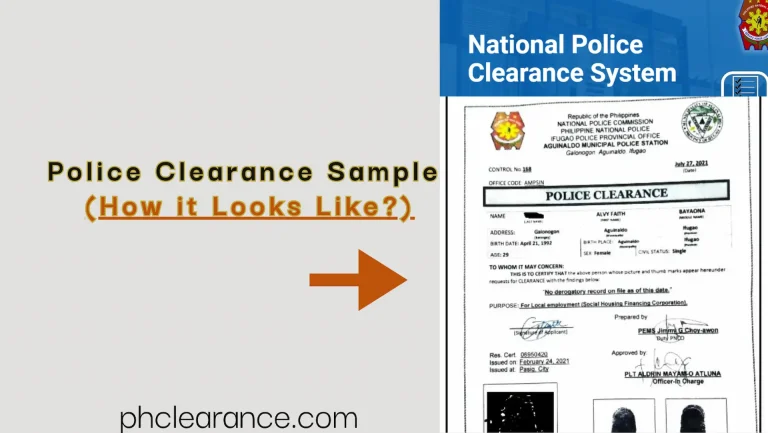
National Police Clearance Certificate(NPCC) or the PNP(Philippines National Police) Clearance in the Philippines is an important document that certifies that the applicant is an honest and trustworthy person. He/she has a clean past free of criminal or unlawful activities.
It is an important requirement for various legal, professional, and personal purposes. It is essential for Filipinos, students, and foreigners in the Philippines.
You will mainly need it for job applications, civil service exams, acquiring valid IDs, opening a bank account, gun ownership applications, renting a house or shop, business registration, and large transactions.
The Police clearance certificate(PCC) acts as proof of trust and transparency and plays an important role in maintaining law and order situations and checking background records of Filipinos.
How does the NPCS Police Clearance Online Verification System work?
The NPCS helps the PNP to check the records of Filipinos and issue their police clearance on the spot. Besides, the national police clearance system(NPCS) also helps in the authentication of police clearance certificates within seconds due to the online access to the NPCS portal by the PNP.
The PNP uses the NPCS(national police clearance system) for verification. The NPCs integrate all the records from the different towns and cities into a single database, which makes the verification/identification process easier for the PNP. Moreover, the applicant’s record can be accessed at any police station.
When you use the online verification process for the national police clearance, the system performs the following checks:
To check whether the certificate is authentic or not. If it is present in the NPCS database, it will show you the certificate.
On entering the data, it will show you the certificate from which you can identify the owner of the certificate.
If your certificate has expired, you can apply for the police clearance online renewal to renew the clearance ID.
Importance of the National Police Clearance Online Verification System:
The online verification process helps to find the validity, authenticity, and the real holder of the clearance certificate. Some of its important aspects are as follows:
It helps prevent fraud by preventing individuals from creating or using fake clearances. Using a mobile or laptop, one can check the authenticity of a clearance ID in less than a minute.
Online verification is simple and fast. Anyone can learn and perform it.
It creates trust among the public in the NPCS system. Because everyone can check the authenticity of the certificate.
Government personnel can check the authenticity of the clearances submitted for visas, permits, licenses, or government service positions.
An employer can check the authenticity, identity, and validity of an applicant’s clearance. It helps in reducing the chance of hiring someone who has fake documents.
Can You Track Your Police Clearance Online in the Philippines?
While police clearance verification confirms the authenticity and validity of an issued certificate, many people also wonder whether they can track the status of their application online, from submission to release.
As of now, the Philippine National Police (PNP) does not offer a full online tracking system for police clearance applications. There is no dedicated tracking portal where applicants can log in and check the real-time status of their clearance after scheduling an appointment.
What is the difference between verification and tracking?
- Verification: It confirms whether an issued certificate is valid and recorded in the PNP system.
- Tracking: It lets you see where your application is in the process, but this feature is not currently available in the NPCS system.
FAQs:
Conclusion:
The police clearance online verification process has now become simple and easy because of the online availability process. Whether you are a government agency, an employer, or an individual confirming your credentials, this online verification process provides a fast and secure way to ensure a certificate is valid, authentic, and belongs to the rightful person.